
Native macOS · live translation

Hear your Google Meet call in German — and reply in German, live.

Lisseno translates meetings both ways on your Mac: you hear Zoom, Teams and Meet in your language, and the call hears your reply in theirs. Your own OpenAI key. Nothing stored by us.

Requires your own OpenAI API key · macOS 14+

No data stored by Lisseno Your OpenAI key stays local No bot joins the call Works almost everywhere
Listen mode Ready
I want to hear
Recent · 1-click to repeat

Interactive preview · sample data · try every screen
Launch film

See Lisseno in motion.

A short walkthrough of the Mac app — listen live, speak back both ways, no bot in the call.

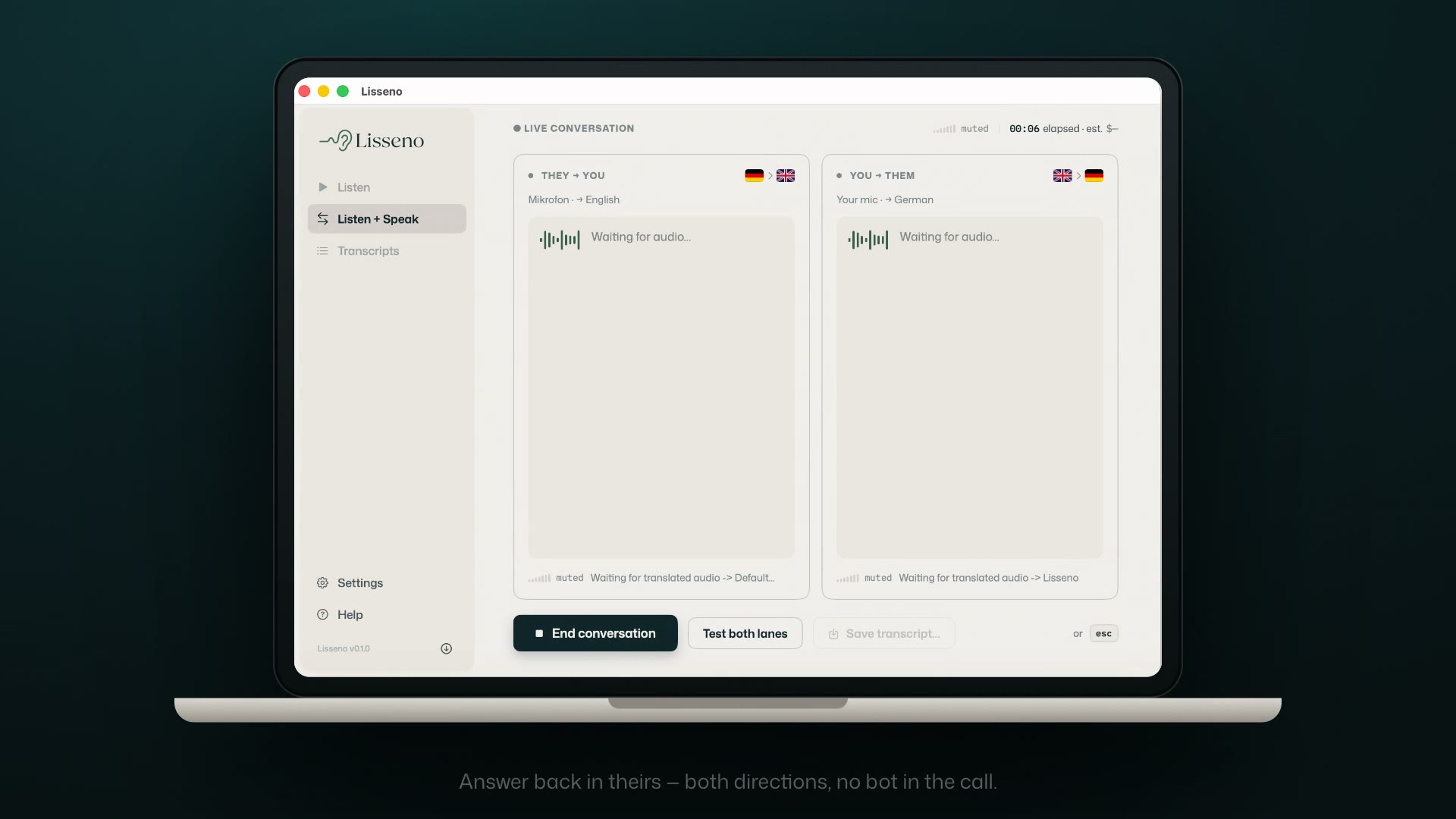
Lisseno on a MacBook — Listen + Speak live conversation view
01 Live listen 02 Speak both ways 03 No bot joins
Why teams use it

Follow the meeting and answer back, both ways.

Hear an international meeting in your language, and reply in theirs. Lisseno runs both directions at once, right on your Mac.

Zoom Google Meet Teams Discord Webex and more
They → You their voice, in your language You → Them your reply, in theirs They EN You DE L Lisseno
The meeting app picks “Lisseno” as its microphone, so no bot joins the call.
Why it matters

It’s not about translation. It’s about being there.

What changes when the language stops being the thing you’re managing.

Man speaking on an evening video call with AirPods in, leaning into the conversation
Speak
Say the hard thing in their language.
Answer in the moment and be understood, without rehearsing the sentence or asking everyone to switch to English for you.
Closing a deal with a customer in São Paulo
Woman on a video call with AirPods in, listening, in a quiet office pod
Listen
Be in the room, not just on the call.
Stop nodding along to a language you only half-follow. Hear every point as it’s made, and catch the nuance you used to miss.
Monday standup with the Tokyo team
Man with headphones watching a talk on a monitor in warm evening light
Watch
Follow the talk you’d have skipped.
A webinar, a podcast, a lecture in a language you don’t speak. Now it just plays in yours, while it happens.
A founder AMA, live from Seoul
Up and running in under a minute

Three choices, then it just plays.

1
Choose a source
Any app or your system audio: a browser tab, a meeting, a video, your mic.
2
Choose the language
Pick the language you want to hear it in. That’s the whole setup.
3
Start listening
Translated audio plays straight into your headphones, live as it happens.
FromGoogle Meet
InGerman
OnAirPods Pro
Start translating
Your OpenAI API key stays local. In BYOK mode, audio goes directly from your Mac to OpenAI. There’s no Lisseno audio backend in between.
Where people use it

You’ll recognise your own situation.

One app, quietly doing the same job in very different rooms.

Watch foreign videos & streams
A talk, a launch, a creator you follow, in a language you don’t speak.
Listen
Follow international meetings
Hear every point as it’s made, no interpreter, no bot in the room.
Listen
Research global markets
Sit in on foreign-language sources and hear them in real time.
Listen
Understand webinars & podcasts
Long-form audio you’d have skipped, now playing in your language.
Listen
Speak back across languages
Reply in the moment and be understood, both directions, live.
Listen + Speak
Pricing

Early buyers can own Lisseno.

Pay once, own it forever. Limited-time lifetime pricing during launch.

Prefer subscription? Monthly and annual remain available.

Selected: Listen Lifetime Launch · €99 one-time
Continue to secure checkout · €99 lifetime
BYOK: your OpenAI key stays yours. Usage billed separately.
Requires your own OpenAI API key OpenAI usage is billed separately by OpenAI VAT included where applicable
Privacy is the architecture

No Lisseno audio backend.

In BYOK mode your audio takes the shortest possible path — your Mac, straight to OpenAI, under your own key.

Your Mac key in Keychain OpenAI your account audio · direct No Lisseno server No bot in the call
No shared Lisseno API key
You use your own OpenAI key — never a pooled one.
No hosted audio backend
In BYOK mode there’s no Lisseno server processing your audio.
Key stored locally on your Mac
Kept in the macOS Keychain, not on our servers.
Audio goes straight to OpenAI
Directly from your Mac, under your own account.
Good to know

Questions, answered.

Yes. Lisseno runs on your own OpenAI API key in BYOK mode — you add it once during setup, and it stays on your Mac.
No. You pay Lisseno for the app, and OpenAI bills you separately for the API usage you actually consume. There’s no markup from us on that.
Lisseno can translate audio from apps and system audio on your Mac — browsers like Brave and Chrome, and meeting tools like Zoom, Google Meet, Teams and Discord among others.
No. Lisseno is a live translation tool, not a certified interpretation service. For legal, medical or other high-stakes settings, use a qualified human interpreter.
With Listen + Speak, your meeting app selects “Lisseno” as its microphone, so your translated reply goes back into the call — no bot joins the meeting.
Not yet — Lisseno is a native macOS app today.
In BYOK mode, audio goes directly from your Mac to OpenAI under your own key. There’s no hosted Lisseno audio backend in between.
Yes — see our refunds page for the policy. Note that OpenAI API costs are billed by OpenAI and sit outside what we can refund.
Native macOS · live audio translation

Put it in your next meeting.

Choose a Lisseno plan, add your OpenAI key, and hear your next call in your own language.

Requires your own OpenAI API key · macOS 14+

Not ready to buy? Get one email when Lisseno ships updates — no spam, unsubscribe anytime.